
Top 5 Free YouTube Thumbnail Previewers Compared (2026)
TL;DR
- Creators search heavily for thumbnail size guidance, but the growth unlock is feed-context preview before upload.
- We compare five free or freemium options: Thumbnail Labs, TestMyThumbnails, Thumblytics, KOL Find tester, and ThumbnailPreview.
- TubeBuddy’s previewer is widely known but advanced testing often sits behind paid plans, noted separately.
- Best all-around free workflow for competitive feeds: Thumbnail Labs (multi-layout + niche search + diagnostics + A/B).
A thumbnail that looks perfect in Photoshop can vanish on YouTube Home.
That is why best free youtube thumbnail tester searches keep climbing alongside size queries. (For context, keyword research around YouTube thumbnail sizing alone shows very high monthly interest in the U.S.; tester/preview terms are smaller but high-intent.)
Below is a practical comparison of free previewers you can use without turning your channel into a browser-extension maze.
What “good” means in a free thumbnail previewer
Score each tool on:
1. Feed realism, Home, Search, Sidebar, Mobile, not one static frame
2. Competitor context, Can you see live niche thumbs?
3. A/B compare, Side-by-side drafts or URLs
4. Diagnostics, Blur/squint, contrast, color issues
5. Friction, Signup walls, installs, paywalls on core preview
Top 5 free YouTube thumbnail previewers
1. Thumbnail Labs, Best overall free competitive preview
URL: https://thumbnaillabs.com/
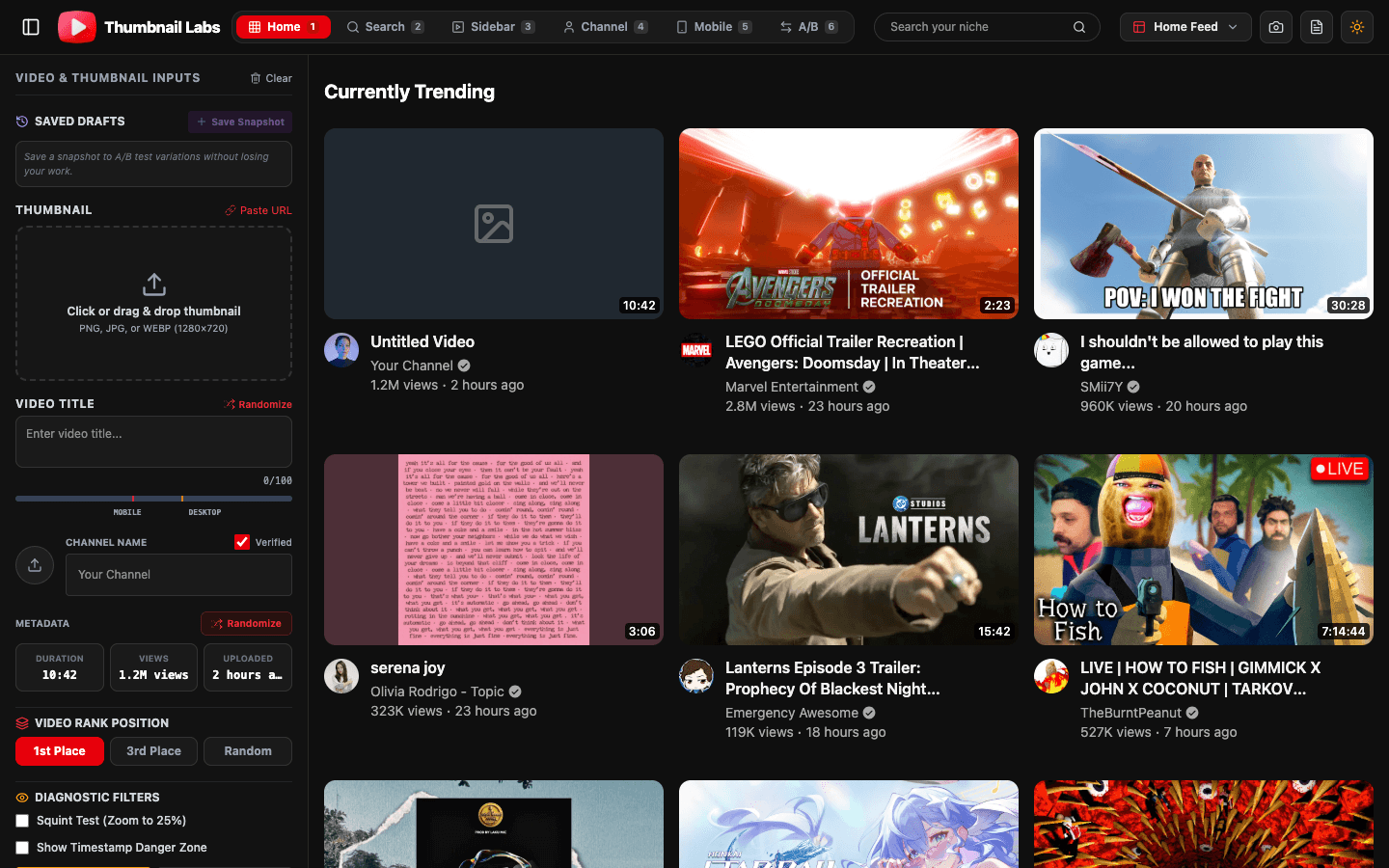
Overview: Thumbnail Labs is a free YouTube thumbnail tester built around real feed simulations. Upload a thumb or paste a URL, validate aspect ratio, then preview across desktop and mobile YouTube surfaces. Search a niche keyword to populate live competitor thumbnails, run side-by-side A/B compares, and use visual diagnostics (squint/blur, grayscale, colorblind simulation) plus AI-oriented CTR scoring signals (contrast, saturation, face detection). Save draft snapshots and export an audit report when you work with a team.
Key features
- 10+ preview modes (Home grid, Search, Sidebar, Channel, Mobile, and more)
- Live niche search for real competitor thumbs
- Split-view A/B with per-side analysis
- Diagnostic suite + CTR-oriented visual scoring
- Draft snapshots and exportable audit PNG
Pros
- Competitive context, not isolation
- Strong mobile + multi-surface coverage
- Diagnostics beyond “does it fit in a box?”
Cons
- Focused on preview/diagnostics (not a full channel management suite)
- You still need YouTube Studio for official watch-time A/B on eligible videos
Best for: Creators and editors who want a serious pre-publish gate without paying for a full toolkit.
Pricing: Free core workflow (as positioned on site).
CTA: Test your thumbnail free →
2. TestMyThumbnails, Simple classic previewer
URL: https://www.testmythumbnails.com/
Overview: Long-running free previewer frequently recommended in creator communities for quick “how will this look on YouTube?” checks (example creator discussion). Good for fast mockups and basic comparison workflows.
Key features
- YouTube-style layout previews
- Easy upload flow
- Lightweight A/B style comparison depending on workflow
Pros
- Familiar, low learning curve
- Fast for single checks
Cons
- Less depth on live niche competition and advanced diagnostics vs newer suites
- Easy to stop at “looks fine in the mock” without deeper tests
Best for: Quick gut-checks.
Pricing: Free tier oriented.
3. Thumblytics YouTube Mockup, Title + thumb mockups
URL: https://thumblytics.com/youtube-mockup
Overview: Free mockup tool focused on previewing how titles and thumbnails appear together in YouTube-like placements. Useful when your experiment is as much copy as art.
Key features
- Title + thumbnail mockups
- YouTube-style placements
- Fast iteration on packaging pairs
Pros
- Forces title/thumb coherence
- Handy for scripting packaging before edit lock
Cons
- May not replace multi-surface diagnostics or live competitor grids
- Depth varies vs dedicated diagnostic suites
Best for: Packaging the promise (title + visual) as one unit.
Pricing: Free mockup entry point.
4. KOL Find Thumbnail Tester, Home + Search mockups, no signup
URL: https://kolfind.com/thumbnail-tester
Overview: Free tester positioned around uploading a thumb and previewing inside Home feed and Search-style mockups without an account wall.
Key features
- Home and Search-oriented previews
- Upload-and-go flow
- No-signup positioning
Pros
- Low friction
- Good first-pass realism
Cons
- Fewer advanced diagnostics called out publicly than full suites
- Limited as a full creative QA stack
Best for: Speed runs when you refuse another login.
Pricing: Free.
5. ThumbnailPreview, Feed-context title/thumb testing
URL: https://thumbnailpreview.com/
Overview: Tooling aimed at testing titles and thumbnails in the context of current YouTube feed/layout patterns and comparison workflows.
Key features
- Feed-context previews
- Title + thumb pairing
- Compare-oriented workflow
Pros
- Context over isolation
- Useful packaging checks
Cons
- Feature set and polish vary; validate against your niche needs
- May lack deeper accessibility diagnostics
Best for: Creators who iterate packaging copy heavily.
Pricing: Free-oriented web tool.
Honorable mention: TubeBuddy Thumbnail Preview
URL: https://www.tubebuddy.com/thumbnail-preview
TubeBuddy is a major creator suite. Its thumbnail preview/tester messaging covers search, suggested, and channel placements, plus A/B style workflows. Per TubeBuddy’s own FAQ copy, preview can be free while A/B testing and advanced analytics may require a paid plan. If you already live in TubeBuddy, use it. If you only need free competitive preview + diagnostics, a dedicated free tool is often enough.
How to choose
| If you need… | Start here |
|---|---|
| Live niche competitors + diagnostics + many layouts | Thumbnail Labs |
| Fast classic mockup | TestMyThumbnails |
| Title + thumb packaging | Thumblytics or ThumbnailPreview |
| Zero signup Home/Search check | KOL Find |
| Full channel toolkit you already pay for | TubeBuddy |
Recommended workflow (any stack)
1. Design 2-3 real variants.
2. Run squint + mobile feed checks.
3. Compare against live niche thumbs.
4. Upload winners.
5. When eligible, confirm with YouTube Studio A/B (watch-time scored).
Conclusion
The best free youtube thumbnail tester is the one that shows your art the way viewers meet it: small, crowded, mobile-first, next to rivals. Isolation previews are better than nothing. Competitive feed simulation is better than isolation.
Run your next draft through Thumbnail Labs, free preview, niche compare, and diagnostics before you publish.